CREATIVE EXPERIMENT
How far can a single mark evolve?
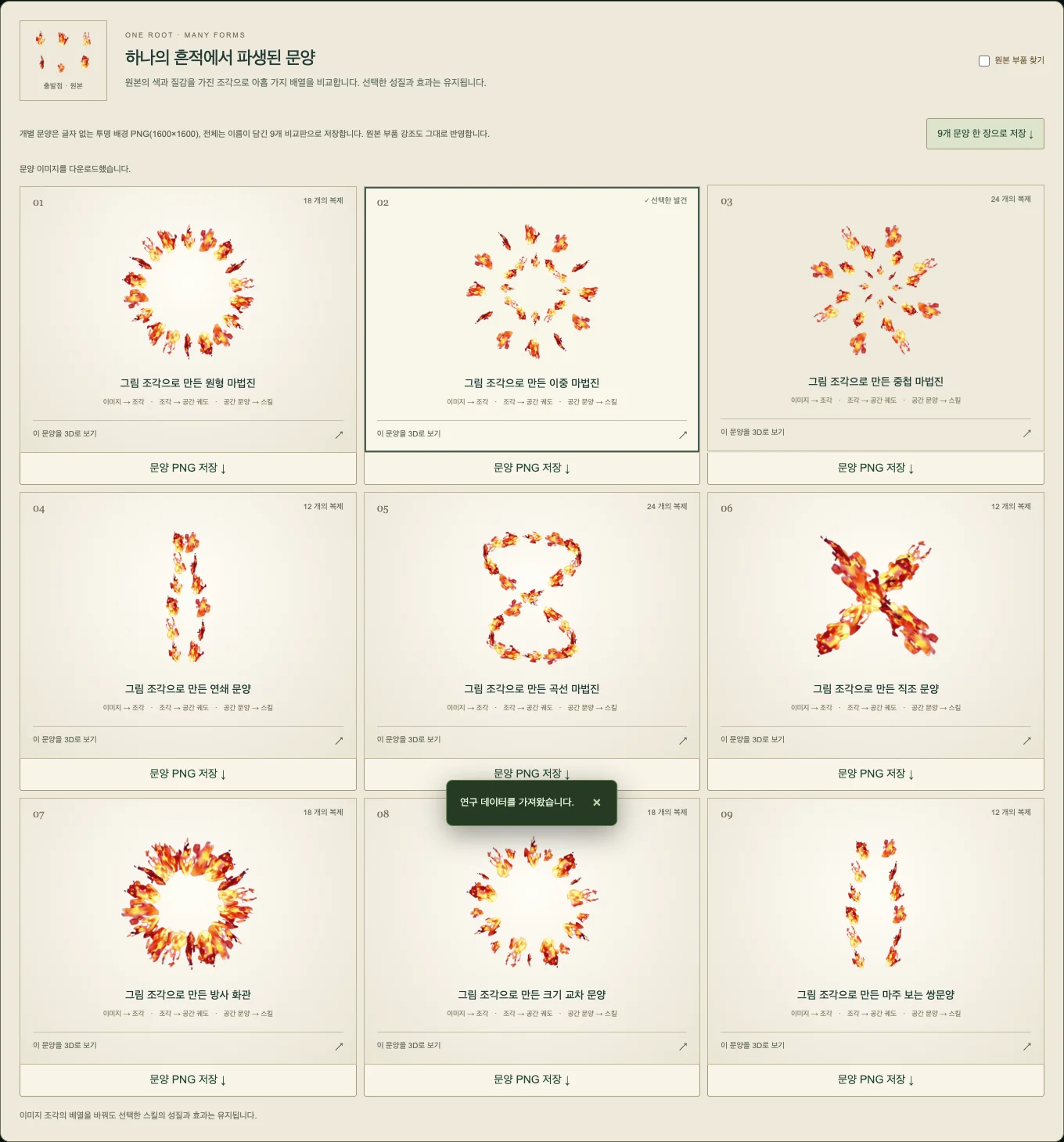
Split an eight into two loops. Layer those loops into a flower-like sigil. Import a flame image and let the flames themselves multiply in space. Explore several possibilities from a small source, then choose the one you like.
Patterns rooted in your source
Compare nine variations made through repetition, rotation, symmetry, and connection. A different arrangement gives the same mark a different character.
Interpret and refine shapes
Explore source variations, shape refinement, and decomposition. Refine recognized forms and discover components at intersections and closed loops.
Image pieces moving in 3D
Materials retain their color, texture, and transparency while following crossing orbits, rising helices, spherical flows, and vortices.
Create, test, and collect
Observe attacks, support abilities, and status effects in the combat sandbox. Export patterns and skill cards, or collect them in your library.
ABOUT THIS EXPERIMENT
Inside the research lab
A new way to look at a small source
Start with dots, lines, letter shapes, scribbles, or an attached image. Compare research perspectives and structural transformations. The generator explores shape, rules, and seeded variations; it does not read the meaning of written words.
A flame image becomes actual flame material
Original-image mode preserves the source pieces’ color and texture. Outline mode extracts lines, and image + outline combines both. Transparency or background differences separate the material; use all detected pieces or select one for a repeated pattern.
Source → separation → copies → manifestation
Watch the pattern become a skill in 3D. Try projectiles, piercing beams, area effects, fragments, rain, eruptions, healing, buffs, shields, shock, silence, and stuns. Yellow marks the caster, green marks allies, and red marks enemies. This is an effects sandbox, so combat win rates are not balanced for competitive play.
Keep the result as your own creation
Export one pattern as a transparent 1600×1600 PNG or all nine as a comparison sheet. Save a skill card PNG and a JSON recipe you can import again. Supported browsers can also record the demonstration. Keep a local collection, or sign in to save to your account and publish to the gallery with comments.
Materials and storage
- Image input
- PNG, JPG, or WebP still images, up to 10MB each. Maximum 16,384px per side and 36 million pixels in total.
- Where processing happens
- Shape analysis and skill generation run in your browser. Choosing account storage or gallery publication also uploads the resized image pieces included in your result.
- Experiment setup
- 3D uses WebGL. Sound and motion controls are available; a larger desktop display is comfortable for detailed comparison and editing.
COMMUNITY
Player reactions
Support Echo Skill Lab
Likes and play feedback are stored per game and browser.
PLAY THE CURRENT BUILD
 Released
 Released
 Released
Loading player reactions.